A foundation in mechanical design
His SolidWorks Rubik's Cube design project received a Gold Award at the Singapore Science and Engineering Fair (SSEF).
From idea to digital object
17 November 2026 · 10am to 1pm · Singapore
A hands-on introduction for high school students. Teams use AI to create a digital object, improve it and explain their design choices.
No prior 3D modelling experience is needed. Meshy is the proposed platform, subject to account and licence confirmation.
From an award-winning mechanical design to engineering simulation and interactive showrooms, Wei Jie combines experience in 3D design with his current work in AI and software.
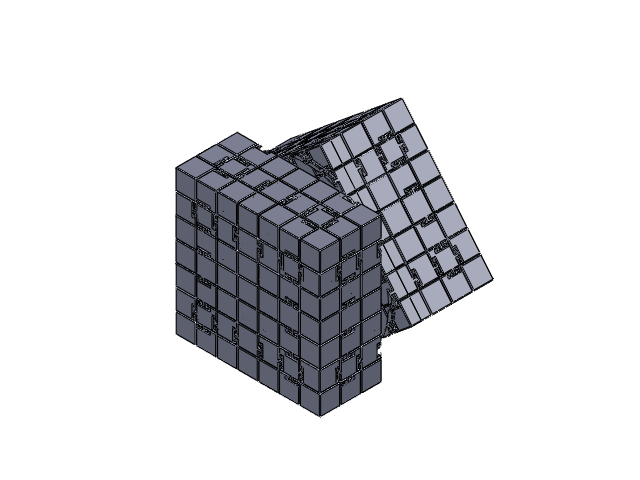
His SolidWorks Rubik's Cube design project received a Gold Award at the Singapore Science and Engineering Fair (SSEF).
At DSO National Laboratories, he used CST to model a balun for a dipole antenna.
For Q Analytica Limited, a London startup associated with Imperial College London and John Hassard, he used ANSYS Fluent to model a solar updraft tower and investigate energy conversion efficiency.
His current work combines Blender and Three.js to create interactive showrooms, including work for Eclat's Henderson Road space.
By the end of the session, participants should be able to:
Watch a demonstration, practise together, then develop a team concept.
Pacing adjusts to students' experience and progress, with a short break during the session.
Explore applications of AI-assisted 3D design through engineering projects and interactive digital environments.
Follow an idea through prompting, model generation, inspection, revision and export. Discuss geometry, textures and common limitations.
Teams generate a simple practice object, examine it from different angles and identify possible improvements.
Create a small exhibition object that communicates an idea. Review the initial result and make a deliberate revision.
Present the object, explain the design decisions and discuss a remaining limitation. Receive the subsequent practical task brief.
Substantial time is allocated to hands-on work. Teams share responsibility for ideas, software operation, inspection, documentation and presentation.
Create a small exhibition object that communicates a cultural, educational or personal idea. A Singapore-inspired display object or souvenir is one possible direction.
After the workshop, teams develop or refine their object using the same software and skills. They may continue their workshop concept or choose a new idea within the same scope.
After the workshop: Allow approximately 1 to 1.5 additional hours for the task, depending on scope and generation times.
Assessment can consider the purpose of the object, how the team inspected and revised it, and how clearly they explain the result.
The proposed platform for generation, inspection and export, subject to confirmation of accounts and licences.
One per team, with internet access and a shared display for the instructor's demonstrations.
The proposed deliverable is a digital model. Physical printing requires separate preparation and confirmation of the available equipment.